Music Letter Notes App
Convert music sheets to the one where name of every note is written right inside its note head
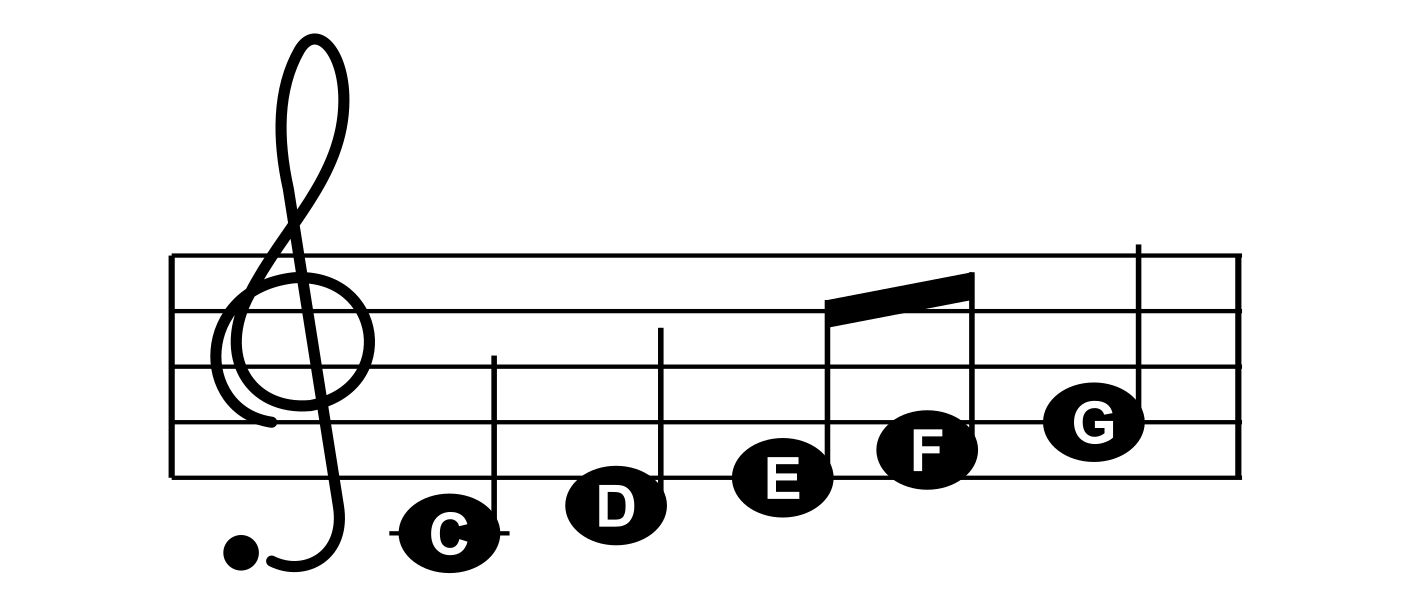
Reading notes takes time to learn. Until it becomes second nature, every note means counting lines and spaces before you can play it. Music Letter Notes does that part for you: add a picture of a page of sheet music and get it back redrawn, with the letter of every note, C, D, E, F, G, A or B, written inside its note head.
Everything else stays where the composer put it: the staves, bars, note lengths, rests, beams and repeat signs. You still read real sheet music, the letters just tell you which note to play while you learn.
Who it's for
- Beginners - Children and adults who are just starting to play the piano, the keyboard, the recorder, the flute, the violin or any other instrument
- Returning players - People coming back to music after years, who know their instrument but forgot how to read notes quickly
- Teachers and parents - Anyone preparing easier versions of pieces for their students or children
- Players by ear - Musicians who play by ear and want to try a piece from the sheet without learning to read notes first
How it works
- Add the pages
Drop scans, screenshots or photos of printed sheet music onto the Add card, or click it to choose them. You can add up to 20 pages at once and they are converted right away, in the order of their file names, so 1.png, 2.png and 10.png come out as pages 1, 2 and 10.
- Check and arrange
Every page comes back redrawn, with the number of staves we found. Put the pages in order with the arrows, fix a note that was read wrong with the pencil, remove a page with the trash button or add more pages at the bottom whenever you like.
- Play it
Click Play, type in the artist, the song title and the tempo (from 20 to 300 beats per minute) and listen to the song played on a piano while the bar being played lights up.
- Download or share
Download each page as an SVG or a PNG image to print it, or, as a member, publish the song in the Music Sheets library for everyone.
What it reads
The converter recognizes the notation found in most printed sheet music:
- Clefs and staves - Treble and bass clefs, single melody lines and piano parts with two staves played together
- Notes and rests - Whole, half, quarter, eighth and sixteenth notes and rests, dotted notes and chords
- Beams and flags - Notes joined by beams, also across rests, and notes with their own flags
- Ledger lines - Notes high above and low below the staff, read from their ledger lines
- Key signatures - The sharps or flats at the start of each line, which change the sound of the notes they name
- Accidentals - Sharps, flats and naturals in front of notes, which hold until the end of the bar
- Ties - Curves joining two notes of the same pitch, played as one long note, also across the bar line
- Triplets - Three notes in the time of two, marked with a bracket and a 3
- Repeat signs - The sections between repeat signs are played twice
- Highlighted bars - Colored boxes around bars don't get in the way of reading the notes
The redrawn pages keep the key signature, the accidentals, ties, triplet brackets and repeat signs, so they read just like the original, and are signed in their bottom right corner with where they were made.
Fixing wrong notes
No reader is perfect, and a smudge or a low resolution scan can turn one note into another. Every page of a draft has a pencil button, next to its trash button and above the page in the player. It opens the notes of the page as text you can change right there:
treble 0 4/4 :: C5/4 D5/4 (E5/8 F5/8) G5/4 | A5/2. r/4
- One line for every staff - From the top of the page down, starting with the clef, the key signature and the time signature, with an empty line between the systems and
|between the bars. - Notes and rests - A note is its letter, a sharp, flat or natural sign where one is printed, its octave and its length, like
C#5/8for a C sharp eighth note. A rest isrwith its length, liker/4. - Everything else - Chords, ties, beams, triplets, grace notes and repeat signs have their own short marks, explained in the dialog.
- Checked before saving - A mistake in the text is pointed out with its line and bar, and the page is redrawn and played with the corrected notes right away. Bars you didn't change stay exactly where they were.
- Only in drafts - The notes can be fixed by the author of the draft until the song is saved or published.
The player
Every converted song can be played in the browser on a real piano sound. Only the samples of the keys the song uses are loaded, so it starts quickly.
- Notes view - The pages of the song, with the bar being played highlighted, a playhead going through its notes and the notes already played turning blue. The page scrolls by itself to keep the music in sight.
- Piano view - The notes fall onto a piano keyboard with the name of every key written on it, and the keys light up as they are played, the treble and the bass in different colors.
- Tempo - Slow the song down to practice and speed it up again with the minus and plus buttons, without losing your place.
- Repeat and seeking - Play the song in a loop, or drag the progress bar to any moment. The Space key plays and pauses.
The Music Sheets library
Music Sheets is a free, public collection of songs converted to letter notes and shared by our members. 118 songs are shared so far. Everyone can open them without an account, play them with the same player and download their pages as SVG or PNG images.
- Find a song - Each song has its own card with a picture of its first page, the artist, the number of pages and its votes.
- Popular or newest - Switch between the songs with the most votes and the ones published most recently.
- Votes - Members vote songs up or down during the first day after they are published, just like posts in our tech news.
- Verified by people - Every song is checked by our admins before it is listed.
Sharing your songs
Members can publish the songs they convert. After playing a draft, click Publish Publicly, check the artist, the song title and the tempo and confirm. Guests log in first, and if you don't have a role yet you'll pick one; the role page explains how to become a member.
- The song waits for verification and is listed once an admin approves it. Until then only you and the admins can see it.
- You can have up to 3 songs waiting for verification at a time.
- Once published, a song can't be edited or removed by its author, so check the pages before you publish.
- Your songs are listed in your profile, visible only to you and the admins.
- Please share only sheet music you have the right to share, like your own arrangements or music in the public domain.
Questions
What kind of sheet music works best?
Printed sheet music, like the PDFs and images made by music notation programs. Straight, sharp scans and screenshots give the best results. Handwritten music can't be read, and photos need to be taken from straight above, flat and in good light.
Which files can I add?
Images, like PNG, JPG or WebP files. To convert a PDF, save or screenshot its pages as images first.
What is left out?
Lyrics, chord symbols, dynamics like mf, fingering and other text aren't part of the redrawn page. First and second endings and jumps like D.C. al Coda aren't followed when playing, and the tempo is the one you type in, not the one printed on the sheet.
Does it cost anything or need an account?
No. Anyone can convert, play and download sheet music for free, without an account. Drafts are kept for 7 days after their last change, so keep the link of your draft to come back to it. Publishing in the Music Sheets library is for members.
Can I fix a note that was read wrong?
Yes, until you save or publish the song. Click the pencil above the page, either in the draft or in the player, and correct the note in the text of the page. If many notes come out wrong, a sharper or bigger image of the page usually helps more: remove the page with the trash button and add the better image.